Creating a viral TikTok video is not only about luck. The most successful videos usually follow a clear structure: a strong opening hook, natural product placement, engaging visuals, useful information, and a simple call to action. For TikTok Shop sellers, the challenge is turning these elements into new videos quickly and consistently.
With Oumomo’s Viral Remake, you can recreate the structure and selling style of successful TikTok product videos while generating original content for your own products.
What Makes a TikTok Video Go Viral?
Before making a viral TikTok video, it is important to understand what makes people stop scrolling and continue watching.
Most high-performing TikTok selling videos include several key elements:
- A strong hook within the first few seconds
- A relatable problem or daily-life scenario
- Clear product benefits
- Natural demonstrations instead of overly polished advertising
- Fast-paced visual changes
- A simple and believable call to action
For example, a beauty video may begin with a common concern such as dry skin or difficult makeup application. The creator then introduces the product naturally, demonstrates how it works, and explains why it is useful. This structure keeps the video entertaining while still supporting product conversion.
However, manually studying and recreating successful videos can take a significant amount of time. You need to analyze the script, scene changes, camera movements, product placement, speaking style, and overall pacing. This is where AI can make the process much easier.
How Oumomo Viral Remake Works
Oumomo is an AI video creation platform designed for TikTok Shop sellers, brands, creators, and agencies. Its Viral Remake feature helps you analyze and recreate the structure of TikTok selling videos with your own products.
The process is simple:
- Choose a reference TikTok video.
- Upload images of your product.
- Let Oumomo analyze the original video structure and your product information.
- Select the language, generation model, video format, and duration.
- Generate a new product video and view it in Project Management.
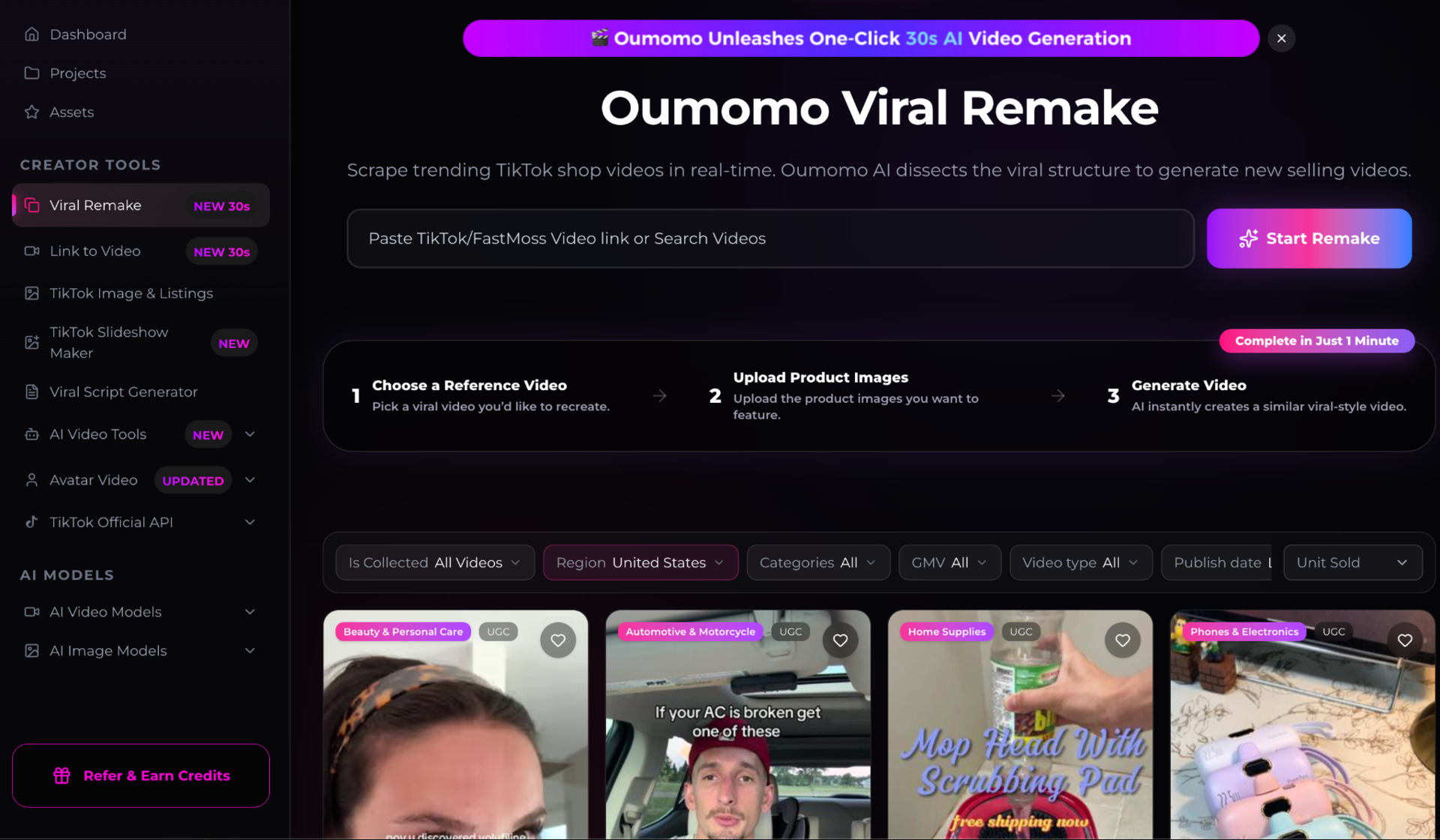
The Oumomo Viral Remake workspace allows users to paste a TikTok or FastMoss video link, or search through available videos. You can explore videos from different categories, regions, and content types to find a suitable reference for your product.
This means you do not need to start every video from a blank page. You can begin with a proven content structure and adapt it to your own product and target audience.
Step 1: Choose a Suitable Reference Video
The first step is to find a TikTok video that matches your product category and target audience. It could be a beauty tutorial, a home product demonstration, a fashion video, a gadget review, or a lifestyle recommendation.
When selecting a reference video, pay attention to:
- Whether the opening scene immediately attracts attention
- How quickly the product appears
- How the creator explains the product benefits
- Whether the video feels natural and creator-led
- How the video ends and encourages viewers to take action
The goal is not to copy the original creator word for word. Instead, Oumomo identifies the underlying structure and creates a brand-new selling video based on the same type of content logic.
This helps you learn from successful viral videos while keeping the generated content relevant to your own product.
Step 2: Upload Your Product Images
After selecting a reference video, upload clear images of the product you want to promote. You can provide multiple product views, packaging images, usage images, or product detail images.
Oumomo can automatically analyze the uploaded product images and identify important selling points, including:
- Product appearance and design
- Main functions
- Materials and textures
- Usage scenarios
- Product details
- Potential customer benefits
You can also add additional information in the remake prompt, such as product features, price, target audience, preferred tone, or specific changes you want to make.
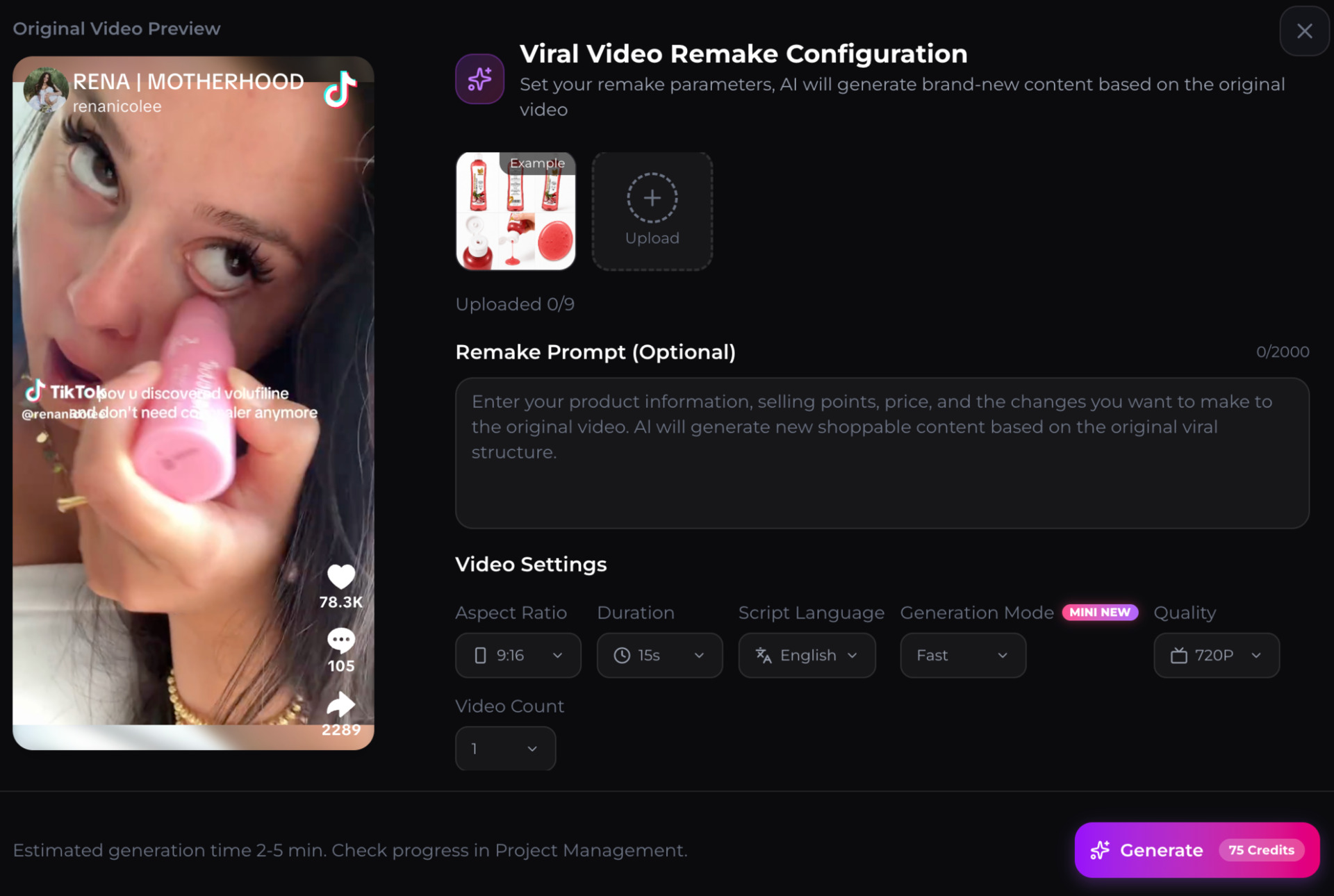
For example, if you upload images of a skincare product, Oumomo may recognize the packaging, product texture, and visual details. You can then add information about the product’s main benefits and ask the AI to create a natural TikTok-style demonstration.
This makes the process especially useful for sellers who have product images but do not have professional video footage or an in-house production team.
Step 3: Let AI Deconstruct the Original Selling Video
Oumomo automatically breaks down the reference video into its key creative components. Instead of simply duplicating the original video, the AI studies how the video communicates with viewers.
It can analyze elements such as:
- The opening hook
- Scene sequence
- Product appearance timing
- Demonstration style
- Dialogue structure
- Emotional tone
- Camera perspective
- Call-to-action pattern
The AI then combines this structure with the selling points of your uploaded product. As a result, the generated video follows a familiar viral content format while presenting new product information.
This is useful for TikTok sellers who want to create multiple variations quickly. You can use different reference videos, products, languages, and creative directions to test which format performs best.
Step 4: Choose the Language and AI Video Model
TikTok sellers often target customers in different countries and regions. Oumomo supports multiple languages, allowing you to create product videos for different markets without writing every script manually.
You can select the language that fits your target audience and generate localized dialogue and product messaging. This helps sellers adapt one product to markets such as the United States, Latin America, Southeast Asia, and other regions.
Oumomo also supports different Seedance generation models, including Seedance 2.0 Mini, Fast, and High. Each model can be selected according to your creative needs:
- Seedance 2.0 Mini: Suitable for fast content testing and lightweight video creation.
- Fast: Designed for efficient generation when you need to produce content quickly.
- High: Better suited for projects that require more visual detail and a refined result.

You can also adjust settings such as aspect ratio, duration, video language, video count, and quality. For TikTok Shop content, the vertical 9:16 format is usually the most suitable choice.
Step 5: Generate Multiple TikTok Video Variations
One reference video can inspire several different product videos. Instead of relying on a single creative, you can create variations with different languages, hooks, scenes, and product messages.
For example, the same product could be presented through:
- A problem-and-solution video
- A daily routine video
- A creator-style product recommendation
- A quick product demonstration
- A before-and-after concept
- A customer-use scenario
Creating multiple variations allows you to test different creative directions on TikTok. Sometimes the most successful video is not the one with the most polished visuals, but the one with the most relatable opening and natural product presentation.
Oumomo helps you move from one product idea to multiple TikTok-ready video concepts much faster.
Step 6: Check All Generated Videos in Project Management
After generation starts, you can access the Project Management page to check the progress and manage your videos.
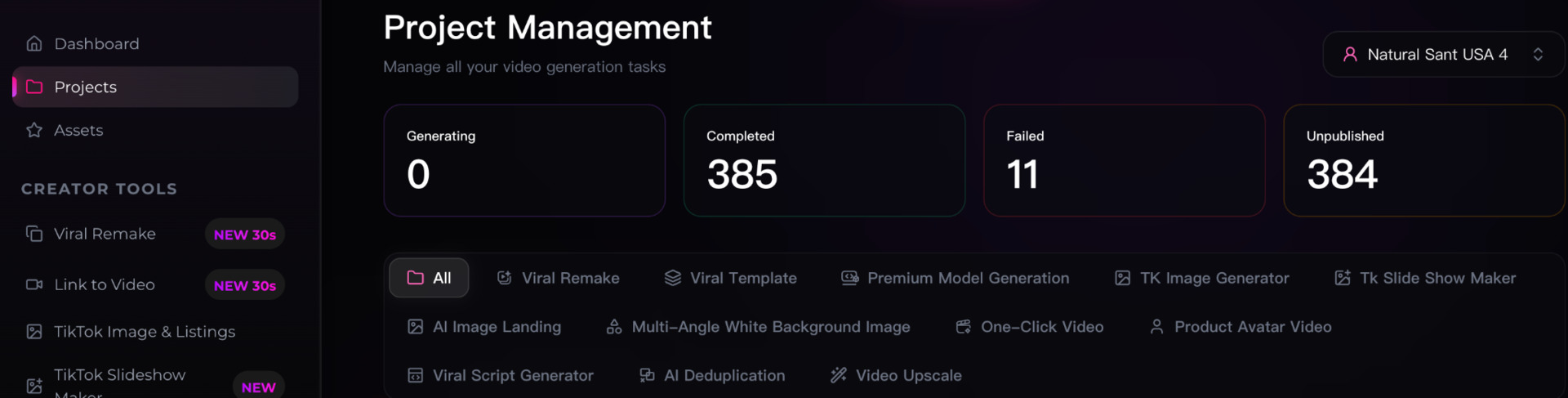
Project Management brings your generated content together in one place. You can view different project types, including Viral Remake videos, AI-generated videos, image-based content, and other creative projects.
The page also helps you distinguish between videos that are generating, completed, failed, or unpublished. This makes it easier to organize your content library and find the videos you want to review or publish.
For sellers producing content at scale, this is particularly useful because all video generation tasks can be managed from one centralized workspace.
Best Practices for Creating Viral TikTok Selling Videos
Oumomo can simplify the production process, but the quality of your input still matters. To create stronger results, follow these practical tips.
First, choose reference videos that are closely related to your product category. A viral video may have millions of views, but its structure may not be suitable for every product.
Second, upload clear and complete product images. Include the front, side, back, packaging, and important details whenever possible. More useful visual information gives the AI a better understanding of the product.
Third, clearly describe the most important selling points. Even though Oumomo can automatically analyze product images, additional information can help the AI focus on the benefits that matter most to your customers.
Finally, test different video variations instead of depending on only one version. Change the opening hook, dialogue style, target language, or reference video and compare the results.
Create Your Next TikTok Video with Oumomo
A viral TikTok video usually combines a strong creative structure with clear product communication. The difficult part is not only recording the video—it is identifying what makes the original content engaging and adapting that structure to a new product.
Oumomo Viral Remake automates this process. It can deconstruct TikTok selling videos, identify the structure behind them, analyze product selling points from uploaded images, generate new videos in multiple languages, and support Seedance 2.0 Mini, Fast, and High models.
Once your videos are generated, you can manage them through Project Management and continue building a complete library of TikTok Shop content.
Ready to create your next product video? Try Oumomo Viral Remake or visit the Oumomo AI website.
Frequently Asked Questions About AI Video and TikTok
Can AI create videos for TikTok?
Yes. AI video tools can generate TikTok-ready videos from product images, text prompts, reference videos, or product information. They can help create scenes, scripts, dialogue, product demonstrations, and short-form advertising content much faster than traditional video production.
Can Oumomo automatically analyze my product’s selling points?
Yes. After you upload product images, Oumomo can analyze important visual information such as the product’s appearance, features, usage scenarios, design, and potential customer benefits. You can also add extra product details, prices, or preferred selling points in the remake prompt.
Where can I find my generated TikTok videos in Oumomo?
After generation begins, you can view your tasks and completed videos in Oumomo Project Management. The page organizes videos by status, including generating, completed, failed, and unpublished projects.
Is AI-generated TikTok content safe to use?
AI-generated content should still follow TikTok’s community guidelines, advertising policies, intellectual property rules, and product-specific regulations. Always make sure that you have permission to use a reference video, avoid misleading product claims, and review the final video before publishing.
How can I start creating AI videos for TikTok?
You can start by visiting Oumomo Viral Remake, selecting a suitable TikTok reference video, uploading your product images, and choosing your preferred language and Seedance model. After generation, you can review and manage all your content in Project Management.
Does Oumomo support different languages for TikTok videos?
Yes. Oumomo supports multiple languages, making it easier to create localized TikTok videos for different markets. You can select the script language based on your target audience and generate product content that is more suitable for international TikTok Shop campaigns.
Which Seedance models are available in Oumomo?
Oumomo supports Seedance 2.0 Mini, Fast, and High generation modes. Mini and Fast are useful for quickly testing multiple video ideas, while High is more suitable when you want a more detailed and refined visual result.
What video format should I use for TikTok?
The vertical 9:16 format is usually the best choice for TikTok because it fills the mobile screen and matches the platform’s native viewing experience. When creating a Viral Remake video in Oumomo, you can select the aspect ratio, duration, language, generation mode, quality, and video count.