Quick Answer: To sell on TikTok Shop, your product images have to clear review and make the product obvious fast. Keep the first image clean and accurate. Use the rest of the gallery for scale, use cases, variants, and lifestyle context. Oumomo’s TikTok Image Generator helps sellers turn product photos and selling points into TikTok-ready listing images without shooting every version by hand.
If you are learning how to sell on TikTok Shop, start with the images. They are easier to fix than reviews, price, shipping, or creator content. A clear TikTok Shop main image helps shoppers recognize the product. A useful gallery answers the small questions that stop someone from clicking, adding to cart, or buying.
This guide covers the image side of TikTok Shop selling: compliant first images, stronger product galleries, AI-generated product images, and how to use an AI product image generator without creating listing assets that oversell or misrepresent the product.
Jump to:
Why TikTok Shop product images matter
TikTok Shop is not a normal product catalog. On Amazon or Google Shopping, buyers often arrive with search intent already formed. On TikTok, a shopper may discover your product from a video, a creator post, a live stream, search, or a Shop surface while they are still deciding whether they care.
So your TikTok Shop product images are not just there to fill the gallery. They help decide whether the shopper gives the listing a chance.
The first product image has to make the item instantly recognizable. The gallery has to answer the questions a buyer would normally ask before adding to cart. What is it? How big is it? What does it look like in use? Does it match the variant I selected? Can I trust this listing?
TikTok’s Seller Center guidance is clear on the basics: product listings can include multiple square images, images should be at least 600 x 600 pixels, the first image should clearly show the product, and sellers should avoid watermarks, borders, promotional text, and misleading visuals. In practice, that means the first image should not carry the whole sales pitch. Build a clean image set where each visual has a job.
Practical takeaway: Your first image earns trust. Your product gallery earns the click. Your product page, price, reviews, and offer earn the sale.
A solid TikTok Shop image set usually needs:
- A clean TikTok Shop main image that shows the exact product.
- Secondary listing images that show angles, scale, features, accessories, or included items.
- Lifestyle or use-case images that help buyers picture ownership.
- Localized visuals or listing text when selling across markets.
- Enough product image variants to test what earns clicks without drifting away from policy.
Doing this manually for one SKU is fine. Doing it across a catalog is where an AI image generator for ecommerce starts to earn its keep.
The image mistake that hurts TikTok Shop listings
A lot of sellers treat the product image as a final upload task: find the cleanest photo, crop it square, and move on.
That is enough to create a listing, but it is rarely enough to create a high-performing TikTok Shop listing.
A more useful way to think about TikTok Shop images:
Your first image earns trust. Your gallery earns the click. Your product page earns the sale.
If the first image looks unclear, over-edited, misleading, or cluttered, buyers hesitate. If the rest of the gallery repeats the same angle five times, buyers learn nothing new. And if the images feel like generic ecommerce assets, they may pass review while still underperforming in a TikTok shopping flow.
The answer is not louder images. It is more useful images.
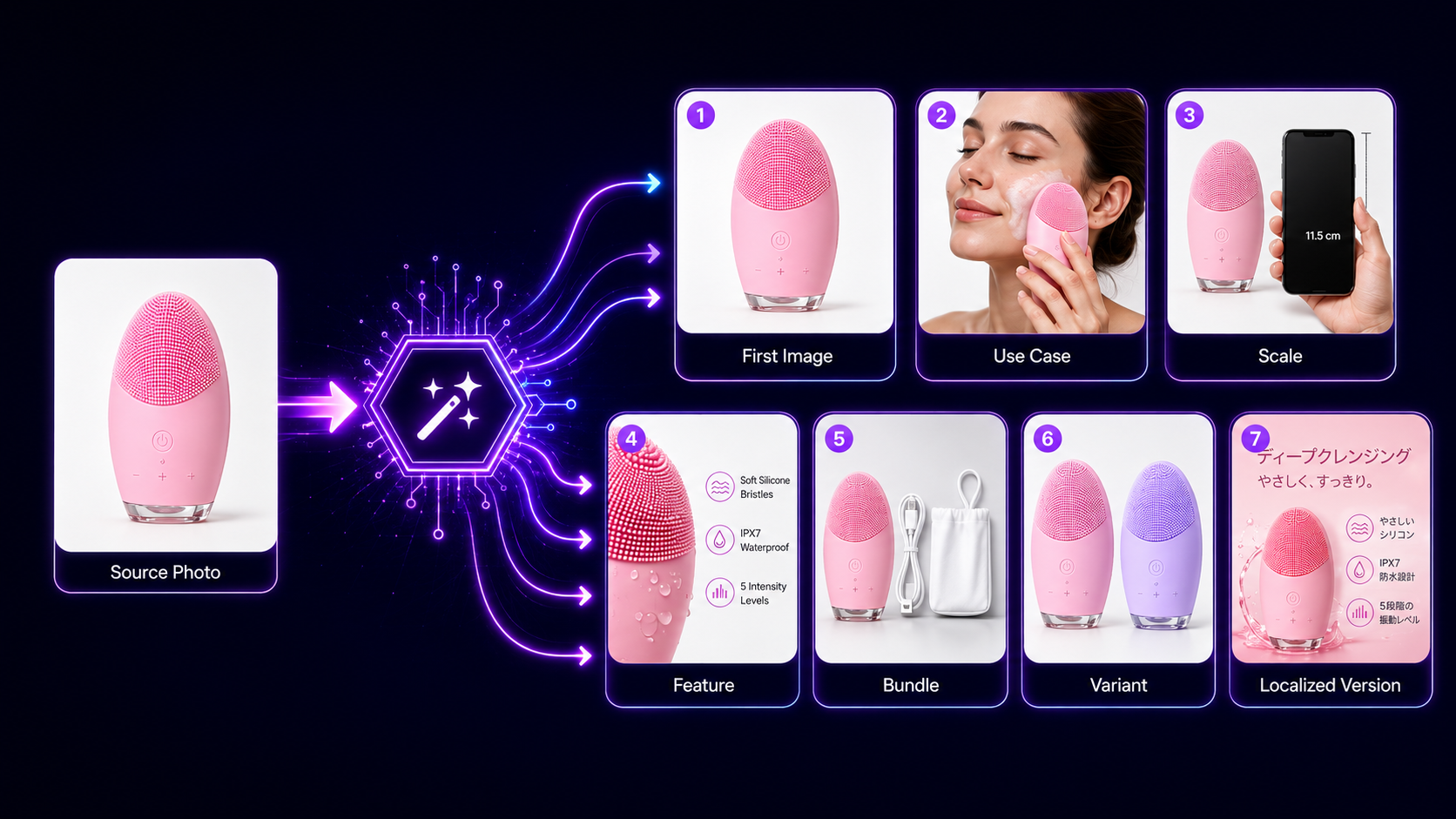
- Image 1: Clean product view with accurate color, shape, and variant.
- Image 2: Product in use, showing scale and context.
- Image 3: Key feature close-up.
- Image 4: What is included in the box.
- Image 5: Variant or size comparison.
- Image 6: Lifestyle result or use case.
- Image 7: Localized image for another country or language.
A product photo shows what the item is. A selling image set helps the shopper decide whether it belongs in their cart.
What a high-converting TikTok Shop image set needs
Good TikTok Shop listing images usually get four things right: compliance, clarity, context, and testing speed.
1. Make the first image review friendly
TikTok Shop image rules vary by category and market, but the safe baseline is simple. Keep the first image clean, accurate, and centered on the product.
Avoid:
- Watermarks.
- Borders.
- Promotional badges.
- Heavy text overlays.
- Misleading before-and-after claims.
- Showing accessories that are not included.
- Crops that hide important product details.
A non-compliant image can slow down approval, confuse customers, or create review issues later. A clean first image is not boring. It tells the shopper, “Yes, this is the thing you are buying.”
2. Make the product understandable in one glance
A buyer should not have to zoom in or read the product title to understand what they are looking at.
Clear TikTok product photos usually have decent lighting, sharp focus, accurate colors, a simple composition, enough space around the product, and a crop that keeps the item easy to see on a phone.
If the image is beautiful but the product is hard to identify, it is not doing its job.
3. Use the gallery to answer buyer questions
Secondary images can do the work the first image should not try to carry.
Use gallery images to show the product in a real use case, its size next to a hand or common object, materials and texture, included accessories, and any category-specific details buyers care about.
This matters on TikTok because the buyer may be coming from entertainment content, not a deliberate product search. Context helps them move from “interesting” to “I can see myself using this.”
4. Create more than one good option
One perfect-looking image set is still a guess.
Different products win for different reasons. A beauty tool may need a use-case image. A kitchen gadget may need a result image. A storage product may need a before-and-after layout, if the claim is accurate. A fashion accessory may need scale and styling context.
The practical advantage of an AI product image generator is not just speed. It lets you create enough responsible image variations to see what actually earns clicks.
How Oumomo’s TikTok Image Generator fits in
Generic AI image tools can make attractive visuals. TikTok Shop sellers need a narrower thing: accurate product images, square listing formats, country and language options, and outputs that fit how listings are actually built.
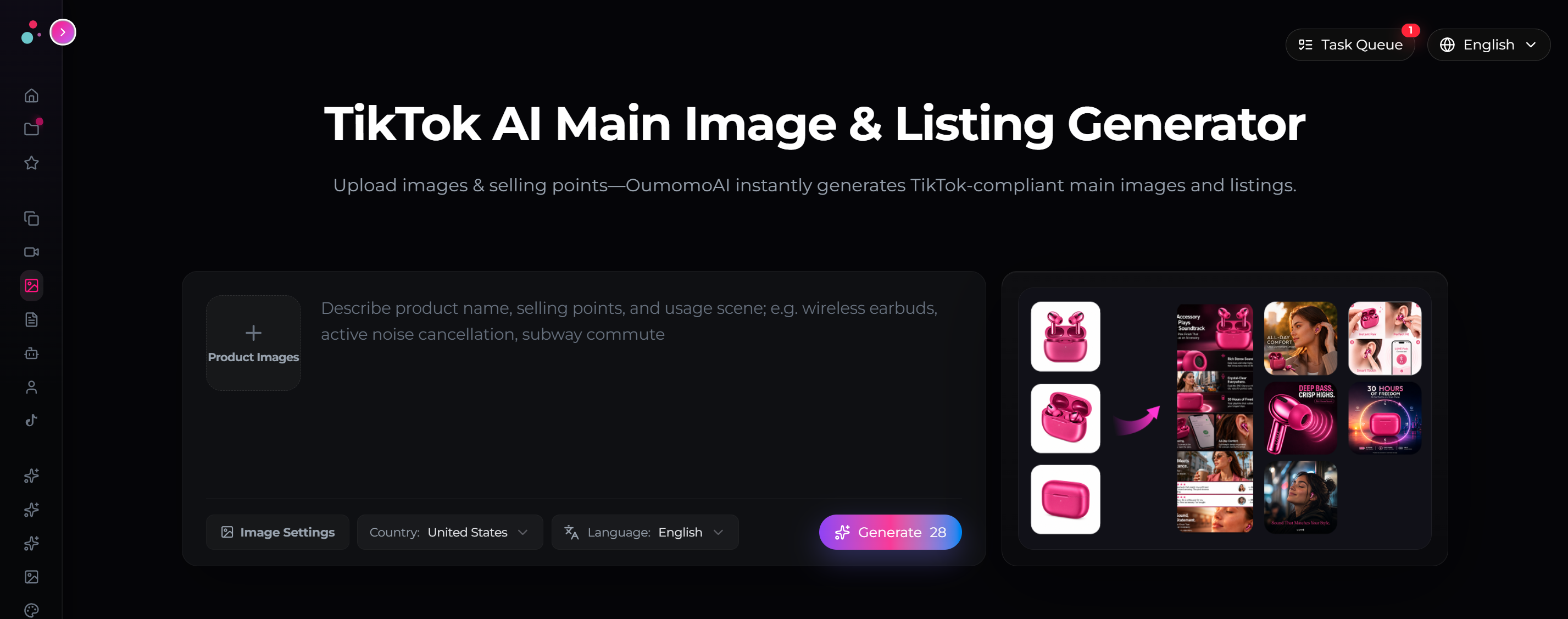
Oumomo’s TikTok Image Generator starts from product photos and selling points, not a blank prompt. That is a better fit for sellers who already know what the product is, but need better listing visuals.
Step 1: Upload clear product photos
Start with the best source images you have. You do not need a full studio shoot, but the photos need to show the product honestly.
Use a front-facing image, one or two angle shots, a close-up of important details, and variant photos if color, size, or bundle options matter. Better inputs usually mean fewer weird outputs later.
Step 2: Add selling points
Oumomo uses your selling points to understand what the visuals should emphasize.
Do not paste in every spec. Focus on the few details buyers actually care about: the problem it solves, who it is for, what makes it different, and what should be obvious before someone clicks.
Weak input: High quality, durable, portable, useful.
Stronger input: Leak-proof travel bottle for gym bags; keeps drinks cold for 24 hours; slim shape fits car cup holders.
The second version gives the image system something concrete to work with.
Step 3: Choose country and language settings
TikTok Shop selling is local. A visual that works in one market can feel off in another because of language, framing, seasonality, or buyer expectations.
Oumomo’s country and language settings help sellers generate market-specific AI listing images instead of translating and redesigning assets after the fact. That is useful for cross-border sellers managing several markets from the same product catalog.
Step 4: Generate a complete image set
Do not generate one image and call it done. Generate a set, review it like a seller, then choose the images that match the listing role.
- First image: Clean product view.
- Gallery images: Feature, use case, scale, bundle, variant, or lifestyle context.
- Test variants: Alternate angles or messages for later optimization.
Step 5: Review before publishing
AI can speed up production. Sellers still need to review each output before upload.
- Does the product still match the real item?
- Are colors, size, packaging, and included accessories accurate?
- Is the first image clean enough for review?
- Is any text accurate, readable, and allowed for the image’s role?
- Does the image avoid exaggerated or unsupported claims?
- Does the image match the selected market and language?
This review step is where the seller’s judgment matters. It keeps AI production useful instead of risky.
DIY vs freelancer vs generic AI vs Oumomo
| Option | Best For | Main Advantage | Main Limitation |
|---|---|---|---|
| DIY photography | Very small catalogs or handmade products | Low cash cost and full control | Time-heavy, hard to scale, inconsistent quality |
| Freelancer or agency | Premium products, brand campaigns, complex shoots | Strong creative direction | Higher cost, slower turnaround, revisions take time |
| Generic AI image tool | One-off creative experiments | Flexible and inexpensive | Requires prompt skill and may not understand TikTok Shop listing needs |
| Oumomo TikTok Image Generator | TikTok Shop sellers creating listing assets at scale | Product-photo input, selling-point workflow, country and language settings, TikTok-focused outputs | Still requires seller review for accuracy and compliance |
The right choice depends on your catalog size and creative needs. If you sell a few flagship products, a photographer or designer may still make sense. If you need to refresh many SKUs, localize visuals, or test image angles quickly, a purpose-built ecommerce product image generator is usually more practical.
TikTok Shop image checklist
Use this before uploading or refreshing a listing.
First image checklist
- Product is clearly visible.
- Image is square and at least 600 x 600 pixels.
- Product matches the exact listed variant.
- No watermark, border, promotional badge, or misleading graphic.
- No confusing props or accessories unless they are included.
- Crop does not cut off important product details.
- Color looks accurate.
Gallery checklist
- At least one image shows the product in use.
- At least one image shows size or scale.
- At least one image shows the key feature close up.
- Bundle contents or accessories are shown clearly.
- Text, if used, is short, accurate, and not misleading.
- Localized images use the correct country and language.
- The gallery does not repeat the same angle without adding information.
AI review checklist
- No distorted logos, labels, hands, packaging, or product details.
- No invented features.
- No impossible before-and-after result.
- No unsupported health, beauty, income, or performance claim.
- No mismatch between generated image and product description.
- No visual style that makes the product look like a different item.
This kind of review protects conversion and account health. It also catches the small AI mistakes that shoppers notice immediately.
Where this fits if you already use Oumomo for TikTok videos
If you already use Oumomo for TikTok Shop video workflows like Viral Remake, Link to Video, or TikTok Official Publishing, the TikTok Image Generator fills the listing-asset gap.
Video helps buyers discover the product. The listing image set helps them decide whether the product is worth a closer look.
A simple Oumomo workflow can look like this:
- Pull product photos and selling points.
- Generate a compliant TikTok Shop image set.
- Use the same product input to create TikTok-native videos.
- Publish or schedule video content.
- Refresh image variants when click-through or conversion drops.
That keeps the listing and the feed working from the same product story instead of feeling like two separate campaigns.
Turn product photos into a TikTok Shop image set
Oumomo’s TikTok Image Generator creates TikTok-ready listing visuals from your product photos, selling points, country, and language settings, so you can build cleaner product pages without planning a full photo shoot.
FAQ
What makes a good TikTok Shop main image?
A good TikTok Shop main image clearly shows the exact product, uses a clean square format, and avoids anything that could confuse buyers or trigger review issues. The first image should feel plain and trustworthy. The gallery can do the heavier selling with use cases, scale, features, variants, and lifestyle context.
Can AI-generated images be used for TikTok Shop product listings?
Yes, AI-generated product images can be used for TikTok Shop listings if they accurately represent the product and follow TikTok Shop’s listing rules. Review them before upload. Make sure they do not invent product details, exaggerate claims, or show accessories that are not included.
How many images should I upload to a TikTok Shop listing?
TikTok Shop allows multiple product images, and Seller Center guidance says sellers can upload up to 9 square images per product. You do not need to use all 9 every time. Use enough images to answer buyer questions: product view, use case, feature detail, scale, contents, and variants.
Should I use text on TikTok Shop product images?
Be careful. TikTok Shop guidance says the first image should avoid added text, graphics, watermarks, borders, and promotional elements. If you use text in secondary visuals, keep it short, accurate, readable, and policy-safe. Do not use text to make unsupported claims.
Do I need professional photos to use Oumomo’s TikTok Image Generator?
No. A clear, well-lit product photo is enough to start. Multiple angles usually give better results because the AI image generator has more visual information to preserve product shape, details, and variants.
How is Oumomo different from a generic AI image generator?
Generic AI image tools start from prompts. Oumomo’s TikTok Image Generator starts from product photos, selling points, country settings, and language settings. That makes it better suited to TikTok Shop listing production. Sellers still need to review the results, but the workflow is closer to how ecommerce teams actually create product assets.
Does a better product image set improve TikTok Shop sales?
Better TikTok Shop product images usually affect the early parts of the buying path: impressions, clicks, trust, and add-to-cart intent. Final sales still depend on price, reviews, shipping, product quality, offer strength, and creator content. Product images are not the whole system, but they are one of the fastest listing assets to fix.
Is Oumomo free to try?
Oumomo’s pricing page lists a free plan and paid plans with annual billing discounts. Check the Oumomo pricing page for the current credit amounts, plan limits, and any active offer before publishing a promotion.