Choose a mini website when trust depends on detail. A consultant may need to explain services and show case studies. A local business may need hours, location, policies and booking information. A creator selling a course may need curriculum, instructor background and answers to objections.
Separate URLs become valuable when people search for different topics or when you need to share one specific page. They also make it easier to give each offer its own title, description and supporting content.
Do not build extra pages only to look established. A focused single page can outperform an unfinished site if it answers the visitor’s actual questions.
How should you organize the links?
Put the highest-priority action first, then group supporting links by intent. A simple order is current campaign, core offer, best proof, evergreen content and contact. Move archived or low-value destinations out of the main path.
Use descriptive labels and add a short line of context when the destination is not obvious. The W3C guidance on link purpose explains why people should be able to understand a link from its text or surrounding content.
Avoid presenting ten buttons with identical visual weight. Hierarchy helps people choose and helps you understand what the page is meant to accomplish.
Which option is better for search visibility?
A mini website normally offers more room for distinct, useful pages, internal links and topic-specific content. A link page can still be crawlable, but a list of thin outbound buttons is unlikely to answer broad search questions on its own.
Google’s guidance on crawlable links recommends standard link elements with resolvable destinations. Whichever format you choose, ensure that important navigation works in rendered HTML and that links do not depend entirely on an inaccessible interaction.
Search visibility should not be the only goal. A social-profile visitor may benefit more from a compact page than from a large site menu. Match the landing experience to the source and intent.
What should you measure?
Track visits, outbound clicks and the primary completed action when consent and privacy requirements allow. Use campaign parameters consistently so you can distinguish traffic from different profiles or promotions.
Do not optimize solely for click-through rate. A service inquiry, email signup or sale may be more valuable than many taps to another social network. Define the page’s job first, then select the metric.

Review link order over a reasonable period. Small audiences create noisy percentages, and repeated tests on the same link can distort results.
How can you start small without getting stuck?
Launch one fast page with a clear identity, primary action and a few supporting links. Use a domain or URL you can preserve. As questions repeat, add the smallest amount of content needed to answer them.
Move to a mini website when the single page becomes crowded, different audiences need different explanations or you have search-worthy topics that deserve their own URLs. Keep the original link page as a concise route for social traffic if it still serves that role.
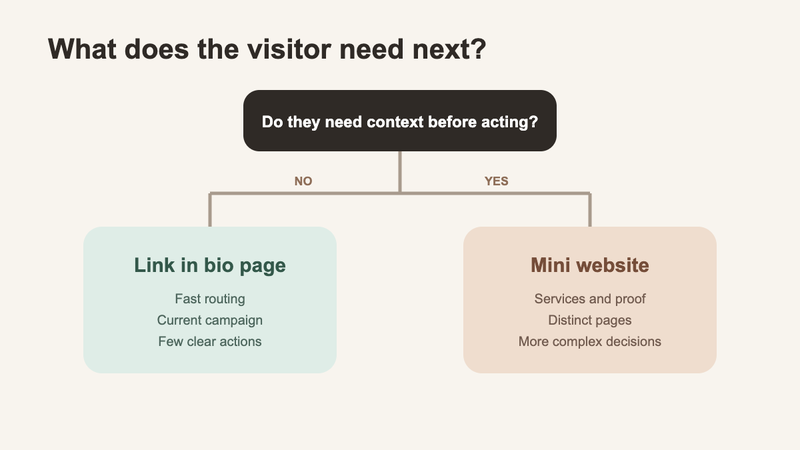
The evolution can be gradual. Format should follow visitor needs, not a one-time label.
FAQ
How many links should a link in bio page have?
Use the fewest links that cover the current visitor needs. Group or remove low-priority destinations when the page becomes difficult to scan.
Do I need a custom domain?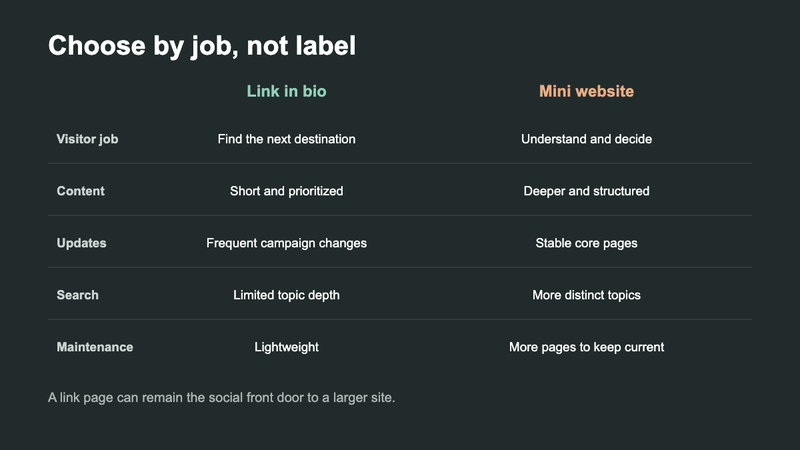
It is not required, but a stable custom domain can improve recognition and reduce disruption if you change tools. Confirm that redirects and ownership are portable.
Can a link in bio page replace a website?
Yes for a simple routing need. It becomes limiting when visitors require deeper information, separate pages, search content or complex conversion flows.
Should every social profile use the same landing page?
Not always. A shared page is easier to maintain, while source-specific pages can match different audiences. Use the simplest setup you can keep accurate.