Avoid converting a PNG to JPEG merely to satisfy a tool unless the checker requires it. If conversion is necessary, retain both files and label which version produced each result.
How do you run a SynthID check?
Google offers verification inside Gemini for eligible, signed-in users. Its help documentation explains that users can upload an image and ask whether it was created or edited by Google AI. Availability and supported inputs may change, so follow the current product guidance.
For a fast browser-based check, a SynthID checker can help organize the first pass. Upload the original image when possible, wait for the analysis and save the exact wording of the result rather than paraphrasing it from memory.
Do not upload confidential, private or rights-restricted material to any third-party service until you have reviewed its privacy terms and your organization’s policy.
What does a positive result mean?
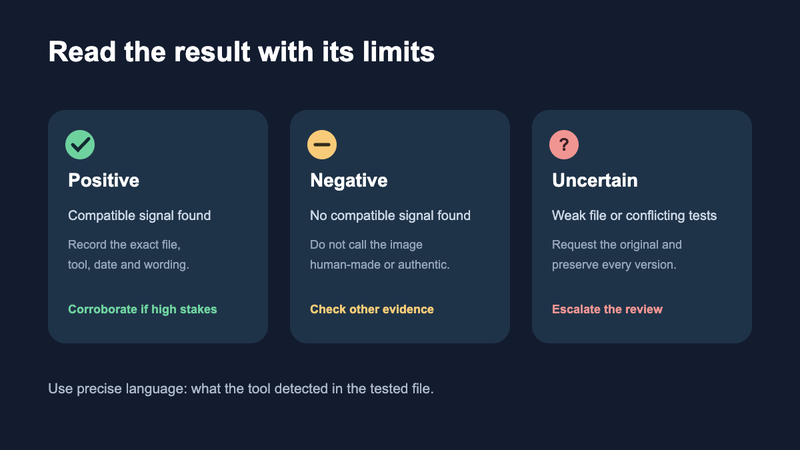
A positive match is evidence that the detector found a compatible SynthID signal. Record the tool, date, submitted file and result. A SynthID checker result becomes more useful when those details are preserved. If the context is high stakes, verify through Google’s current official experience and look for supporting provenance such as Content Credentials.
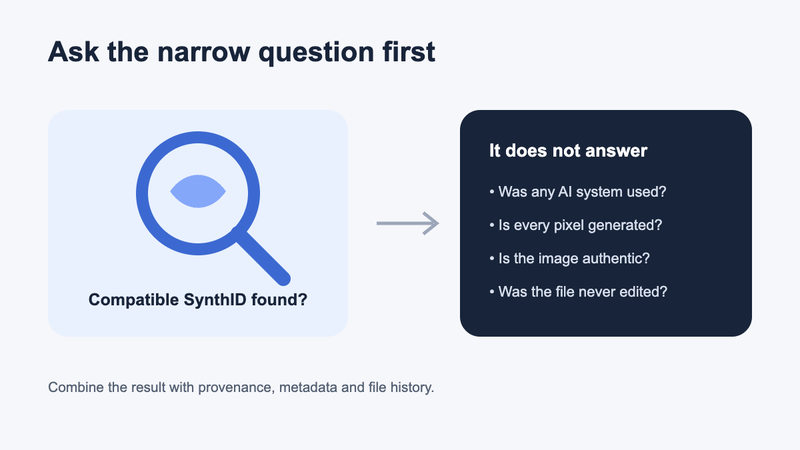
A match does not tell you that every visible pixel came directly from a model. The image may have been generated and then edited, or a real image may have been modified with a supported AI feature. Describe only what the result supports: a SynthID watermark was detected in the tested file.
What does a negative result mean?
A negative result means the tool did not detect the expected watermark in that file. It does not mean “camera-made,†“unedited†or “authentic.†The image could come from another AI system, predate the watermark, fall outside supported products or have undergone transformations that reduced detectability.
Google notes that SynthID is designed to remain detectable after common modifications, but no watermark should be assumed indestructible under every edit. Heavy cropping, repeated recompression and substantial pixel changes can complicate verification.

What other evidence should you collect?
Check for a signed provenance record, including Content Credentials based on C2PA. The C2PA FAQ explains how cryptographically signed provenance can show origin and edit history while making tampering evident.
Inspect metadata for camera information, editing software and export history. Remember that unsigned metadata is easy to strip or alter. Review visual inconsistencies and, if helpful, run a general statistical detector. None of those signals should silently replace the narrower SynthID finding.
A good case note separates observations from interpretations:
- Observation: “No compatible SynthID watermark was detected in
image-original.png.†- Limitation: “The file was downloaded from a social platform and may have been recompressed.â€
- Interpretation: “The result does not determine whether another AI system was used.â€
- Next step: “Request the original file or inspect signed provenance.â€
When should you avoid a definitive claim?
Avoid definitive language when you only have a screenshot, a low-resolution derivative or one ambiguous test. Also pause when different tools disagree. Those conditions do not make the investigation useless; they change the appropriate confidence level.
For moderation, publishing or routine due diligence, a documented multi-signal review may be sufficient. For legal, employment or fraud decisions, preserve the original and seek qualified forensic expertise. The cost of a false accusation is far greater than the convenience of a one-click verdict.
FAQ
Can SynthID detect images from every AI generator?
No. SynthID is associated with supported Google AI generation and editing systems. It is not a universal detector for all synthetic images.
Can cropping remove SynthID?
The watermark is designed to tolerate common transformations, but sufficiently heavy or repeated edits may make a signal harder to identify. Test the closest available original.
Is SynthID visible in image metadata?
Not in the same way as a normal metadata field. SynthID is embedded into the content itself, while metadata is attached descriptive information that platforms may remove.
Should a negative result be reported as authentic?
No. Report it as “no compatible watermark detected in the tested file†and state the tool and file limitations.